
The AI agent that drives your computer.
Ember sees your screen and controls the mouse, keyboard, a real browser, the shell, and your files — with on-screen text recognition so it clicks the right thing, not a guessed pixel. Run it hands-free by voice, or drive your computer from your phone.
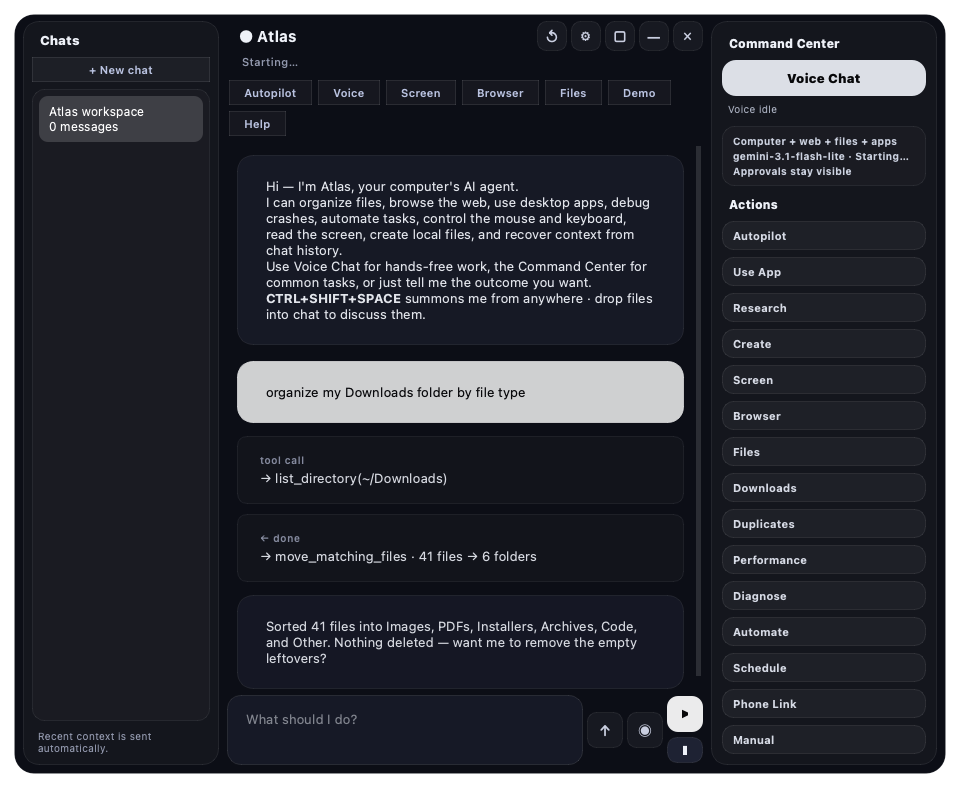
Just ask
Tell it what you want — it does the clicking
Plain English in, real actions out. A few of the things people hand to Ember:
"Clean up my Downloads folder and sort everything into dated subfolders."files & shell
"Find the cheapest flight to Tokyo next month and screenshot the booking page."browser control
"Why does my Wi-Fi keep dropping? Check it and fix what you can."system diagnostics
"Fill out this job application using the details from my résumé PDF."vision + forms
"Summarize this 40-page report and email me the three key points."reasoning + reach
"Rename these 200 photos by the date they were taken."batch automation
Everything a person does on a computer
No browser extension, no API wiring — Ember works your actual desktop.
Sees & clicks accurately
On-device OCR (Apple Vision on Mac, Windows OCR on PC) plus the accessibility tree locate on-screen text and click its exact center — no blind pixel guessing.
Top-tier reasoning
Runs on Gemini for free, with Claude Opus 4.8 — adaptive thinking and streaming — for the hard problems. Or go fully offline with a local model via Ollama.
Real browser control
Drives Chrome/Edge over the DOM — fills forms, clicks links, reads pages — not just screenshots.
Phone remote
Ember Link mirrors your screen to your phone with a trackpad, keyboard, and a chat tab — over your Wi-Fi.
Hands-free voice
Continuous listen → act → speak turns, so you can just talk to your computer.
Asks before risky things
Destructive commands, sending data, and dangerous key-combos prompt for confirmation first.
How it works
See → decide → act, on a loop
Ember runs a real agent loop: it looks, plans a step, performs it, then checks the result and keeps going until the job's done.
It sees the screen
A screenshot is read with on-device OCR and the accessibility tree, so Ember knows exactly what's where — every label, button, and field.
It picks the next move
The model reasons about your goal and chooses one concrete tool call from 170+ — click here, type that, run this command, open that page.
It acts & verifies
Ember performs the step, re-reads the screen to confirm it worked, recovers from surprises, and repeats — with a step budget so it never spins silently.
Private by design
Powerful on your machine, not in someone's cloud
Ember is free, MIT-licensed, and built so your data stays yours.
No Ember servers
There's no backend to send your screen to. Your API key lives on your machine and talks straight to the model provider you choose.
On-device vision
Screen reading uses the OS's own OCR — Apple Vision or Windows OCR — so the pixels never have to leave your computer to be understood.
Secret redaction & audit log
A built-in security suite redacts secrets, blocks malicious sites, and keeps a tamper-evident audit log of what the agent did.
Run it offline
Point Ember at a local model through Ollama for a no-key, no-rate-limit, fully on-device setup.
Open source
The whole agent is on GitHub under the MIT license — read it, audit it, fork it, contribute.
Read-only & sandbox modes
Cap what the agent can touch with capability and read-only modes, or run risky commands inside a real sandbox first.
Good to know
Questions, answered
Is it really free?
Yes. Ember is free and open-source (MIT). Day-to-day it runs on Google Gemini's free tier, so you can use it without paying anyone. Add an Anthropic key if you want Claude Opus 4.8 for the hardest tasks, or run a local model through Ollama for zero cost and zero network.
Where does my data go?
Nowhere you don't choose. There are no Ember servers — your API key stays on your machine and connects directly to the provider you pick. Screen reading is done on-device with Apple Vision or Windows OCR.
Will it do something destructive?
Not without asking. Destructive shell commands, sending data over email/HTTP, and disruptive key-combos all require an explicit confirmation. You can also run it in read-only or capability-limited modes, or sandbox risky steps.
What do I need to install?
On macOS, just double-click Ember.command — it fetches everything (including its own Python) on first launch. On Windows, install Python with "Add to PATH" and run Ember.bat. Then grant Screen Recording + Accessibility on Mac, and you're set.
macOS says it "could not verify" the app — is that a problem?
No. Ember is free and unsigned, so Gatekeeper warns once. Right-click → Open (or Privacy & Security → Open Anyway), and it opens normally from then on. Full details are on the download page.
Does it work on both Mac and Windows?
Yes — the same Ember, same tools, same phone remote, and the same background auto-update on macOS 12+ and Windows 10/11.
One agent, both platforms
The same Ember on macOS and Windows — same tools, same phone remote, same background auto-update.